
Professional Audiovisual Support: The Driving Force Behind a Successful Event
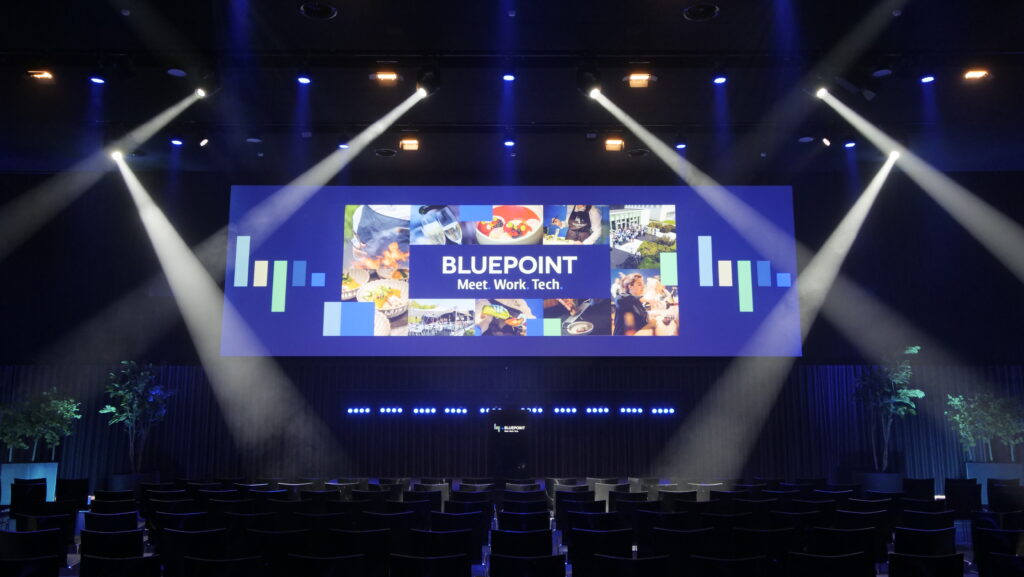
An inspiring keynote, an impressive product launch or a conference that keeps its audience engaged from start to finish: behind every successful event is a technical production team that makes everything run seamlessly. Because the moment a microphone crackles, a video freezes or a speaker becomes difficult to understand, your audience’s attention starts to drift. Professional audiovisual support ensures that sound, visuals and lighting work together to deliver a memorable experience. Your message takes centre stage, while the technology works quietly behind the scenes.
A great presentation deserves more than a good microphone
You’ve spent months preparing your event. The speakers have been carefully selected, the programme is perfectly organised and every participant has arrived. Then the opening presentation begins. The microphone cuts out for a few seconds, the first slides fail to appear and people at the back of the room start whispering.
It’s precisely these small technical interruptions that can undermine your audience’s attention and confidence.
According to research discussed by Meeting Professionals International (MPI), 97% of surveyed event attendees have experienced moments of disengagement during an event. Technical problems are among the main sources of frustration, with poor audio quality proving particularly disruptive.
This makes audiovisual support much more than a practical requirement. It influences how attendees experience your content, how credible speakers appear and how much of the message people ultimately remember.
Good AV technology is barely noticeable. Poor technology, on the other hand, can become the centre of attention within seconds.
That’s exactly why audiovisual planning deserves a place in your very first event preparation meetings.
Sound quality determines whether your message gets through
One of the most common mistakes when organising a corporate event? Judging sound quality purely by volume.
A speaker system capable of producing plenty of decibels doesn’t necessarily guarantee clear speech. Room acoustics, microphone placement, distance from the audience and background noise all play an important role.
A conference with several hundred participants has very different requirements from an interactive workshop attended by twenty people.
An experienced AV technician considers several essential factors:
- Speech intelligibility: every attendee should be able to understand the speaker clearly, including those seated at the back or sides of the room.
- Microphone selection: a headset offers freedom of movement during a keynote, while handheld microphones are often more practical for panel discussions.
- Acoustics: reflections, reverberation and background noise should never interfere with the presentation.
- Audio balance: speech, music and videos each require appropriate volume settings.
- Transitions: when several speakers take turns, the audience shouldn’t experience sudden changes in volume.
Even the most compelling presentation loses its impact when participants constantly have to concentrate just to understand what is being said.
Research into the influence of audio quality on the perceived credibility of business speakers, discussed by audio specialist Shure, highlights how strongly sound quality and intelligibility can shape the way audiences perceive a message.
Practical tip: during the technical rehearsal, ask someone to sit at the back and another person at the side of the room. What sounds perfect to the technician at the mixing desk may not sound equally clear from every seat.
A proper soundcheck should therefore take place where your guests will actually be sitting.
Visuals and lighting turn information into an experience
Visual technology does much more than display presentations. It helps make complex information easier to understand, creates emotional connections and gives important moments greater impact.
Imagine a product launch where a short video unveils a new innovation. Or a corporate event where the company’s annual achievements appear on an impressive screen.
When visuals, lighting and sound are carefully coordinated, they create a cohesive experience that strengthens the content.
That doesn’t necessarily mean relying on spectacular effects. Subtle technical choices can make just as much difference.
A lighting change can draw attention towards the stage. A well-positioned camera allows attendees at the back of the room to follow a speaker more easily. A wide projection surface can make complex diagrams or visual presentations accessible to a large audience.
Above all, every technical decision should serve a purpose.
Ask yourself:
- What information must remain clearly visible from every seat?
- At which moments would visual support help the audience follow the speaker?
- Which parts of the programme deserve additional emphasis through lighting or sound?
- How can the company’s branding and visual identity be reflected in the presentation?
Make sure screen formats and presentation layouts are checked well in advance. Small fonts, complicated charts and insufficient contrast can be difficult to read, even on a large screen.
Finding the right balance between functionality and atmosphere turns audiovisual technology into a valuable communication tool.
Want to explore the possibilities offered by large-scale projections, professional lighting and flexible room layouts? Discover the event spaces at BluePoint Antwerp and find inspiration for your next corporate event.
Technical preparation starts long before the event
On the day itself, a smoothly running event can appear almost effortless. Presentations follow one another, videos start at precisely the right moment and speakers take the floor without interruption.
Behind that apparent simplicity lies meticulous preparation.
A professional AV plan starts with a clear understanding of the programme. A conference featuring several presentations requires a different technical setup from a product demonstration, panel discussion or hybrid meeting.
The first step is therefore not choosing the equipment, but identifying what the event actually needs.
What message do you want to communicate? How many attendees are expected? Do speakers need to move freely around the stage? Will external guests be joining remotely?
Only once these questions have been answered can the technical team develop the right combination of audiovisual solutions.
The planning process should cover at least the following:
- The event running order: precise timing for speakers, presentations, videos and transitions.
- Technical infrastructure: available connections, screens, microphones, network capacity and power supplies.
- Room layout: sightlines, circulation routes, the position of the control desk and potential camera locations.
- Responsibilities: who collects presentations, who approves changes and who makes technical decisions?
- Rehearsals: enough time to test the entire programme under realistic conditions.
- Contingency plans: clear procedures if a critical component unexpectedly fails.
For larger events, maintaining one central version of the running order is particularly valuable. This ensures that the organiser, event manager, presenters and technical crew are all working with the same information.
Collecting presentations also deserves careful attention. Establish a clear deadline and, whenever possible, request all files in their final format beforehand.
Practical tip: schedule not only a technical test but also a short rehearsal with the main speakers. Check how they enter the stage, where they stand, how their microphones work and when their presentations begin.
This builds confidence and prevents unnecessary improvisation once the room is full.
Hybrid events require two equally engaging experiences
When an event brings together in-person and online participants, audiovisual production becomes considerably more complex.
A presentation that works perfectly for the audience in the room doesn’t automatically deliver the same experience to someone attending remotely.
Imagine a speaker turning towards the projection screen during a presentation. People in the room can usually continue following without difficulty. Online attendees, however, may struggle to hear if the microphone isn’t positioned correctly.
The same applies to audience questions. Without suitable microphones, remote participants may hear the speaker’s answer but miss the question entirely.
Hybrid events therefore require an approach that gives equal consideration to both audiences.
According to event technology research compiled by Cvent, 68% of surveyed event professionals incorporate hybrid or virtual meetings into their event programmes.
Connecting both audiences effectively has therefore become an important consideration in event planning.
Several elements are essential for a high-quality hybrid experience:
- Clear camera footage that keeps speakers visible.
- A separately monitored audio mix for online participants.
- Presentations shared directly with remote attendees rather than simply filmed from the projection screen.
- Reliable internet connections with sufficient upload capacity.
- Opportunities for online participants to ask questions and contribute to discussions.
- A dedicated technical specialist monitoring the online broadcast.
It’s also worth preparing an alternative if a remote speaker unexpectedly loses their connection. A telephone dial-in option, a locally saved presentation or an adjusted running order can prevent significant disruption.
Don’t overlook interaction. Hybrid events are far more engaging when remote participants can actively contribute through polls, Q&A sessions and discussions.
Online attendance then becomes a meaningful experience rather than passive viewing.
Wondering how to bring in-person and remote guests together in one professionally managed event? Explore the hybrid event solutions available at BluePoint Antwerp.
Live production: the invisible link between every part of your programme
An event consists of dozens of small moments that need to fit together perfectly.
A speaker walks onto the stage. The lighting changes. The presentation appears on screen. A video follows, before the moderator opens a panel discussion.
When each transition happens naturally, the audience experiences one coherent programme.
That’s the role of the technical production team.
Throughout the event, the AV crew monitors the schedule and coordinates the different technical elements. Microphones are activated and muted, visuals are switched and lighting is adjusted to match the programme.
A central technical director or show caller may coordinate the crew and provide instructions at the appropriate moments.
This requires not only technical expertise but also a genuine understanding of event pacing.
An effective production team knows when a lighting change will strengthen a moment, when a speaker needs a little more time and when a visual effect would simply be unnecessary.
Close collaboration with the organiser is essential.
What happens if a keynote runs ten minutes longer than expected? Or if a scheduled video needs to be replaced at the last minute?
An experienced technical team can adapt the programme without exposing the audience to the activity taking place behind the scenes.
For business events with tightly structured schedules, that flexibility is particularly valuable.
A technical plan B is far from an unnecessary luxury
Even the most carefully prepared event can encounter unexpected technical problems.
A faulty cable, an empty microphone battery or a presentation file that refuses to open: any of these issues can interrupt the programme.
The difference between a minor technical hiccup and a lengthy disruption often comes down to preparation.
Professional audiovisual support therefore includes anticipating the most vulnerable parts of an event.
For important presentations, a spare microphone, backup laptop or alternative connection may prove invaluable.
Livestreamed events may also require additional checks of network connectivity and contingency procedures.
Not every event needs the same level of technical redundancy. An internal meeting for fifteen people obviously requires fewer backup systems than an international conference with hundreds of online viewers.
The key question is therefore: which technical interruptions would have the greatest consequences for your programme?
Start by identifying those risks, then determine which backup solutions are genuinely necessary.
Make sure responsibilities are clearly defined too. Who intervenes if an audio problem occurs? Who decides whether to skip a video? Who informs the moderator if the programme needs to change?
When these decisions have been agreed upon beforehand, valuable time won’t be wasted when something unexpected happens.
Greater impact without unnecessary technical costs
A larger audiovisual package doesn’t automatically make an event better.
The real value of professional support lies in selecting the right resources.
A panel discussion with six participants gains little from spectacular video projections if audience questions cannot be heard properly.
A product presentation focused on visual detail, on the other hand, might benefit far more from a large, high-resolution screen than from an exceptionally elaborate sound system.
Matching technology to your event objectives helps avoid unnecessary expenditure on equipment that adds little value to the attendee experience.
This starts with transparency about what the venue already provides.
Does the room have integrated screens, professional sound equipment and suitable lighting? Are technicians available on site? Which facilities are included, and which services involve additional charges?
That information is essential when comparing quotations.
According to the EMEA Planner Pulse survey conducted by Cvent and Northstar Meetings Group, 35% of surveyed planners use event production and AV technology to support meetings and events.
For organisers, this offers a useful reason to treat audiovisual requirements as part of the overall event budget rather than as a separate purchase.
A venue with integrated technical infrastructure can reduce the need for external equipment, transport and additional setup.
This can offer organisational and financial advantages. When less equipment needs to be transported, related logistical movements and their environmental impact may also decrease.
The actual savings naturally depend on the type of event and its technical requirements.
When requesting a quotation, therefore, don’t just ask about equipment rental costs. Include technical operation, setup, dismantling, rehearsal time and backup solutions.
This helps prevent unpleasant surprises later.
The AV checklist every event organiser should follow
A good technical briefing doesn’t need to be a complicated document. Reviewing a few essential points with your venue or technical partner already provides a solid foundation.
Use this checklist during your final planning meeting.
Before the event:
- Has the final room layout been coordinated with the audiovisual installation?
- Have all presentations, videos and other media files been collected and tested?
- Are the appropriate microphones available for speakers and panellists?
- Have screen formats, aspect ratios and connections been checked?
- Is everyone clear about who coordinates the technical production?
- Are the necessary backup solutions available?
- Has sufficient time been allocated for a complete rehearsal?
On the day:
- Check sound levels from different positions throughout the room.
- Test videos, including audio and any subtitles.
- Make sure presentations remain clearly visible from the back rows.
- Test lighting under the same conditions that will apply during the programme.
- Allow each speaker to briefly test their microphone and presentation.
- For hybrid events, check the audio and video exactly as online attendees will experience them.
- Appoint one clear point of contact for last-minute changes.
One final check may seem obvious, but it deserves extra attention: test the programme as it will actually be delivered.
A microphone that works perfectly in an empty room or a projection that looks excellent with the lights switched off won’t necessarily perform the same way throughout the event.
The more realistic the rehearsal, the smaller the risk of unwelcome surprises.
Why a venue with integrated AV support makes such a difference
When the event venue and technical crew work closely together, organisers gain an important practical advantage.
The technicians know the room acoustics, lighting possibilities, connection points and specific characteristics of each space.
This makes it easier to provide useful advice early in the planning process.
Is a particular stage layout feasible? Can several visual sources be combined? How should audio be organised for a panel discussion? And what technical solutions are available for remote speakers?
When these questions can be discussed directly with the specialists involved, preparations become more efficient.
Communication is usually more straightforward during the event too.
The event manager, catering team and technical crew can coordinate the timing of presentations and breaks, for example.
At BluePoint Antwerp, this integrated approach combines professional audiovisual infrastructure with technical support on site.
The Marco Polo room, for instance, offers a 12-metre-wide projection surface controlled using Resolume technology, allowing multiple visual elements to be coordinated through a single production system.
For events where impressive visuals and precise technical direction play an essential role, this creates exciting opportunities.
The same principle applies to smaller meetings, however: technology should always be tailored to the programme, participants and intended experience.
A well-equipped venue therefore does more than simplify practical arrangements. It gives you more freedom to focus on what really matters: your event content and the people attending.
When everything works seamlessly, your message takes centre stage
The real power of professional audiovisual support becomes apparent when nobody is thinking about the technology anymore.
Speakers can focus entirely on their presentations. Attendees follow the programme effortlessly. Visuals reinforce the content, sound remains crystal clear and each part of the event flows naturally into the next.
That’s the difference between an event where technology is simply available and one where it actively contributes to the outcome.
So don’t invest solely in equipment. Invest in thoughtful preparation, reliable technical production and experienced professionals who understand what your event needs to achieve.
Want to make sure your next corporate event delivers on both the technical and organisational fronts? Discover the audiovisual facilities and personalised support available at BluePoint Antwerp, and discuss the best approach for your event with our team.